
Screens
Today
The N companies to contact today — a frozen morning list with the rules in plain sight.
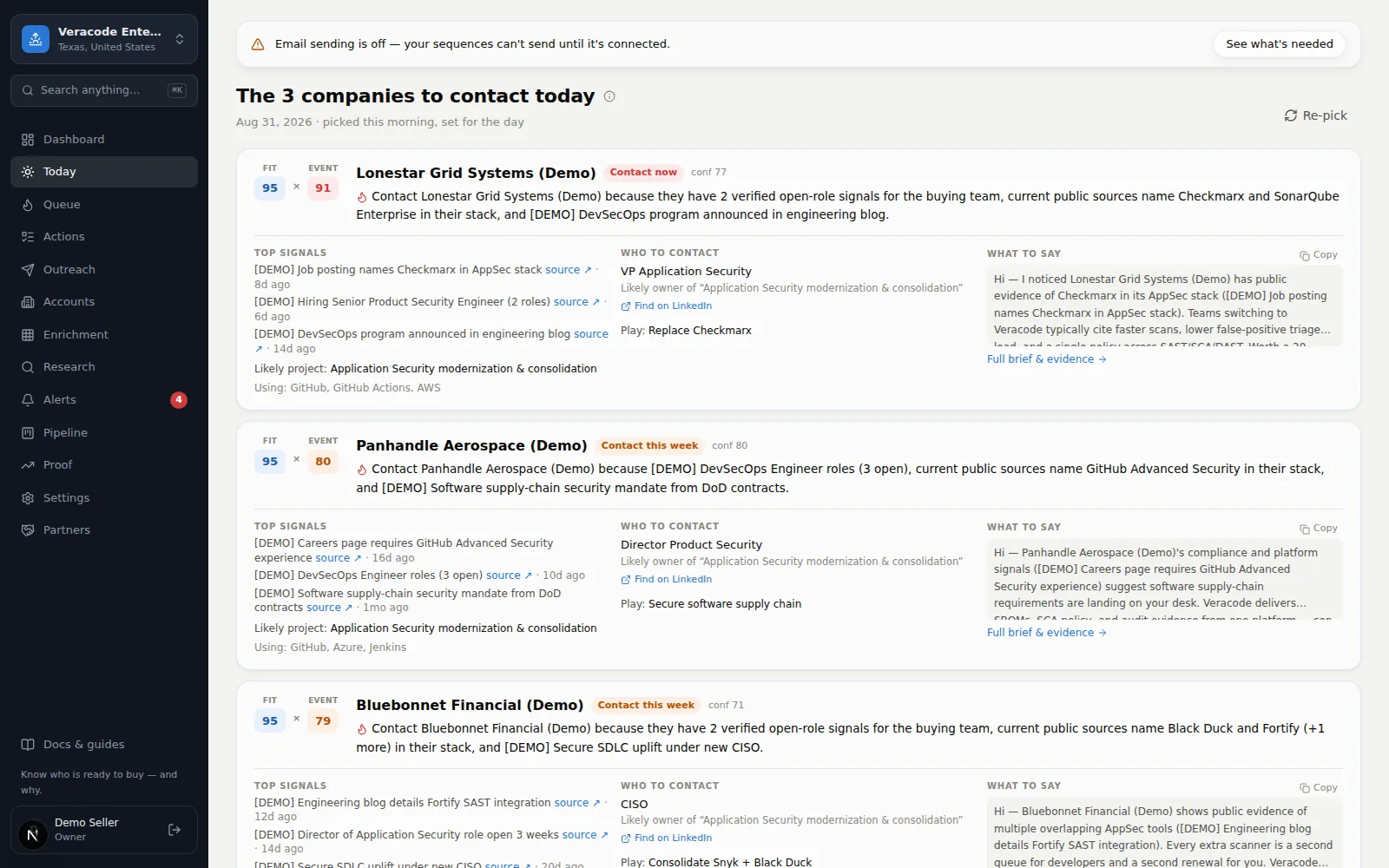
Today is the product's promise on one screen: the N companies to contact today, picked fresh each morning and then frozen for the day so the list is a stable ritual, not a slot machine. Each card is a compact trigger brief — Fit and Event scores, the why-now line, the top sourced signals, a Using line when there is technology to list (only technology with a public source and a confidence above Needs Verification — a technology lead without one isn't listed), the recommended person (with a LinkedIn handoff link), and a ready email opener.
How the list is picked
The rules are deliberately simple, and the screen shows them under “How this list is built” — with how many companies were left out for a low assessed fit, how many were included with fit not yet assessed, and, for an empty list, when it last looked again:
- Event score ≥ your Call this week threshold — something is happening now.
- ICP fit ≥ 50, or not yet assessed — plausible customers only. A fit that is only the Needs-Verification baseline counts as “not yet assessed” and stays in (its Fit chip reads “—, fit not assessed” rather than the baseline number); a fit that research actually judged below 50 leaves the list.
- No touch in the last 7 days — a call, email, meeting, or LinkedIn activity logged on the account takes it off the list while you work it. An email a sequence sent counts too, so an account in the middle of a cadence sits out.
- Yesterday's picks return only with a new signal — repeats are flagged with what changed, so the list never nags.
- Ranked by Event × Fit; list size is the Daily Brief size setting (default 12).
The list is built once a day: the daily agent pre-builds it at 6:00 a.m. Central, and if that hasn't happened yet the first person to open Today builds it. If the list came out empty, Today looks again when you open it (at most every 15 minutes) until it has picks, and Re-pick rebuilds it on demand. Accounts whose status is Customer or Disqualified are not picked.
The morning email
The same list can land in your inbox: one email per morning covering the workspaces you can see that have companies to contact (archived workspaces never appear). Each teammate switches it on or off for themselves with Email me the Daily Brief every morning in SettingsTeamYour preferences — it starts off for new accounts — and Send me a test delivers today's brief to you immediately (it stays disabled until the box is ticked, and at most 3 test emails go to one address an hour). In the email and in the Slack post, a company whose Fit is still only the starting estimate reads “fit not yet assessed” instead of a number (a webhook receives fit_score: null with fit_assessed: false). The email carries an unsubscribe link: the page it opens asks you to press Unsubscribe (opening it changes nothing), then turns off just your morning email — it never touches the do-not-email list or any other email — and offers Re-subscribe. An empty day sends nothing — no filler, no noise.
Fit says whether; Event says when
Working the list
- Open & email takes you to the account page, where the composer and the full brief live.
- Log touch (Call, Email, LinkedIn, Meeting) records a human-touch activity. The card is marked Contacted with the time, and the mark survives a reload — it comes from the activity you logged, so a teammate opening Today sees it too. The same touch starts the 7-day cooldown, so the account sits out tomorrow's pick.
- The opener shows its email subject; Copy copies subject and body together, and a long opener expands with Show all.
- Confidence N/100 says how solid the story is — the ⓘ tip explains what goes into it.
- When research has only a job title, the person reads Role-based target — no verified person yet; Diurno HQ never invents a name. The action chip uses the same four labels as everywhere else (Call now / Call this week / Monitor / No trigger yet).
The subtitle shows when the list was picked (“picked at 7:02 AM, set for the day”). If the list can't load, the page says so with Try again — it never pretends nothing is hot.
Re-pick
Re-pick (top right) regenerates the selection with the same rules — useful after a research run lands mid-morning. It asks first, because it rebuilds the list for everyone in the workspace — companies may be added or removed, and today's current picks only come back if they still qualify — and a toast confirms when it's done. The day's email doesn't re-send. When nothing qualifies, the page says so and links to the Queue and to Research instead of showing an empty count.