
Screens
Settings
Scoring, automations, enrichment, integrations, research profile, team, workspaces, billing.
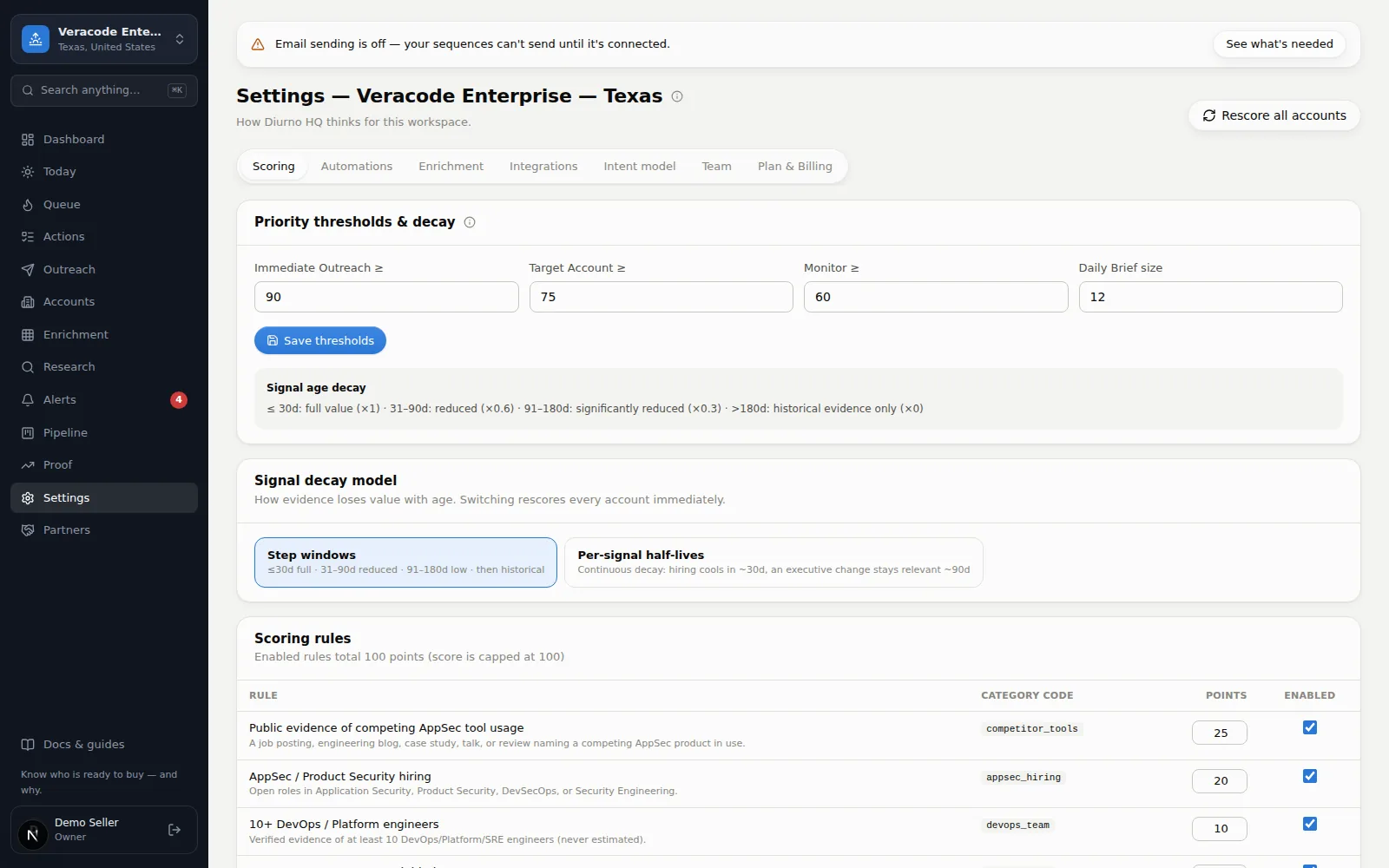
Settings is where you tune how Diurno HQ thinks for the current workspace — the subtitle names it (“Workspace: …”). Eight tabs (owners and admins get the Workspaces tab); here's the map, with links to the guides that use each one. The open tab is part of the address (?tab=automations, enrichment, integrations, model for Research profile, team, workspaces, billing; Scoring has none), so reload and shared links keep it. Cards marked All workspaces — Team, Plan & billing, Salesforce, HubSpot, and OnePageCRM — apply to your whole organization, not just this workspace.
| Tab | What lives there |
|---|---|
| Scoring | Priority-band thresholds, labelled Call now ≥, Call this week ≥, Monitor ≥ (they must stay in that order), the Daily Brief size (1–50 — how many companies Today surfaces), how fast old evidence fades (the Signal decay model card, which spells out your own windows), and the scoring rules themselves — each rule's points (whole numbers, 0–100), on/off switch, and description, with its ID shown in small type under the name. A new rule only needs a name; its ID is generated from it (“API security initiative” → api_security_initiative). Any rule can be deleted after a confirm (which rescores every account), or simply switched off. Owners and admins edit all of this; members see it read-only. Changing a rule's points or switch, deleting a rule, and changing the thresholds or the decay settings each rescore every account on their own; Rescore all accounts (top right, owners and admins, a few runs per ten minutes) forces a recompute when you want one. See How scoring works. |
| Automations | When-this-then-that rules with firing history. The fields explain their placeholders ({account}, {score}, …) right underneath. Owners and admins create, pause and delete rules; members see them read-only. See Set up automations. |
| Enrichment | Your question columns — add, run for every account, delete. Same questions as the Enrichment Grid. |
| Integrations | Everything that connects Diurno HQ to the outside world, owner/admin only. Sending hours & deliverability — your company's mailing address (printed in every email's footer; email is held without one — a street number or PO box number and a city are expected, and it saves as one line); sending hours for sequences (the end must be after the start) in any time zone (common ones first) or the workspace default, US Central; the daily limit (10–2,000), which one-off sends count toward; and a live SPF/DKIM/DMARC check on the domain Diurno HQ sends from (each record ticked when found, a dot with what to add when not, or a question mark when DNS couldn't be queried, with Check now; with no domain set up yet, it links to Open email setup →, which opens OutreachSet up email sending), plus a red line when the newest email from the workspace didn't go out. Slack & webhooks — a Slack incoming-webhook URL for morning-brief digests and urgent alerts, plus a signed outbound webhook for your own systems — a public https:// address (port 443, no username or password, nothing on a private network) that is checked when you save it and again when you press Send a test (6 tests per five minutes per organization); its signing secret is masked with Reveal and Copy buttons, and Disconnect asks first. Under each connected channel the card shows the last delivery since the server started, and how the newest morning post went; Send a test counts as that channel's last delivery (a failed test reads as failed until a later delivery or test works), and changing or removing a channel's address clears its record while the other channel's stays; an urgent alert is sent once with no retries, alert posts to one address are spaced about a second apart, and a “slow down” answer (HTTP 429) is waited out rather than counted as the address being down; an address that fails five alerts in a row is paused for 30 minutes for alerts (the once-a-day morning post is always attempted, and a successful post lifts the pause). Your website — the tracking snippet that turns visits from tracked companies into scored signals (how it works). Salesforce (Beta), HubSpot and OnePageCRM — credentials, connection tests and, for Salesforce, the sync options, Sync now and account import (connect your CRM). On the Free plan the CRM and email-sending cards say they're part of the paid plans. |
| Research profile | A Workspace profile card — name, vertical / product, description, territory, metros, and buying personas (owners and admins edit it, then Save workspace) — plus read-only lists of the qualification criteria, competitor catalog, and sales play library the research agent works from. This is the brain research reads before every job. Members see it all read-only. |
| Team | Full team management: add teammates, change roles (Member, Admin, Owner), restrict which workspaces each person can see (nothing selected = all), and deactivate accounts — with guardrails (only owners manage owners; the last owner can't be removed; promoting, demoting, and deactivating all ask first; reactivating someone needs a free seat; an admin limited to some workspaces can give access only to workspaces they can see, and can't manage a teammate who can see more than they can; a workspace such an admin creates is added to what they can see, so they can open it). A teammate whose only workspace was deleted reads “No workspace access” until you give them another; when they sign in they are told “You don't have access to a workspace yet” (with a Sign out button) instead of being shown the setup wizard. Adding a teammate doesn't send an email — share the temporary password with them yourself. A teammate who's locked out gets a Reset password button on their row: it suggests a fresh temporary password, you share it, and they're signed out everywhere until they use it. Everyone changes their own under Your password (current password, then the new one twice) — that signs out their other sessions. Also home to Your preferences: the Email me the Daily Brief every morning switch (off for new accounts; the email covers the workspaces you can see and carries an unsubscribe link) with its Send me a test button (disabled until the box is ticked), and which app your call buttons open (your computer's calling app — OpenPhone, Quo, FaceTime — or Google Voice). A number typed with an extension dials the main number only; the extension is shown beside it, never appended. |
| Workspaces | Owners and admins only. Every workspace with its account count — Archive one you've stopped using (hidden and paused, nothing deleted), Restore it later, or Delete… it for good after typing its name. On a plan with a workspace limit, archived workspaces still count toward it. See Archive or delete a workspace. |
| Plan & billing | Your plan, limits, and usage — accounts, seats, and this month's research meter (instant research on paid plans; the 40 overnight runs on Free). On a paid plan, owners also see the plan catalog with a Switch button (Convert on a pilot) that records the contract change (it also appears in the team's orders list, a move to a plan whose account or seat limit is below your current usage is refused, and plan changes are invoiced — no card is charged here). On Free, Request an upgrade sends your plan choice to the team, who activate it; on a pilot, Request a pilot extension asks the team for another 90 days. See Plans & pricing. |
Changed thresholds or rules?
Saving a rule change, new thresholds or new decay settings rescores every account on the spot, and a toast says how many were rescored. If the bands still didn't move, open an account's score breakdown: a rule adds points only when a sourced signal is tagged to it, and an account with no live evidence stays low whatever the weights say. Rescore all accounts (owners and admins) forces a recompute.