
Screens
Research Queue
Where research jobs live: submit companies, watch progress, run the agent.
The Research screen is the job queue behind everything Diurno HQ looks up. Submit a company on the left; watch every job — research, enrichment, outreach, people checks — on the right.
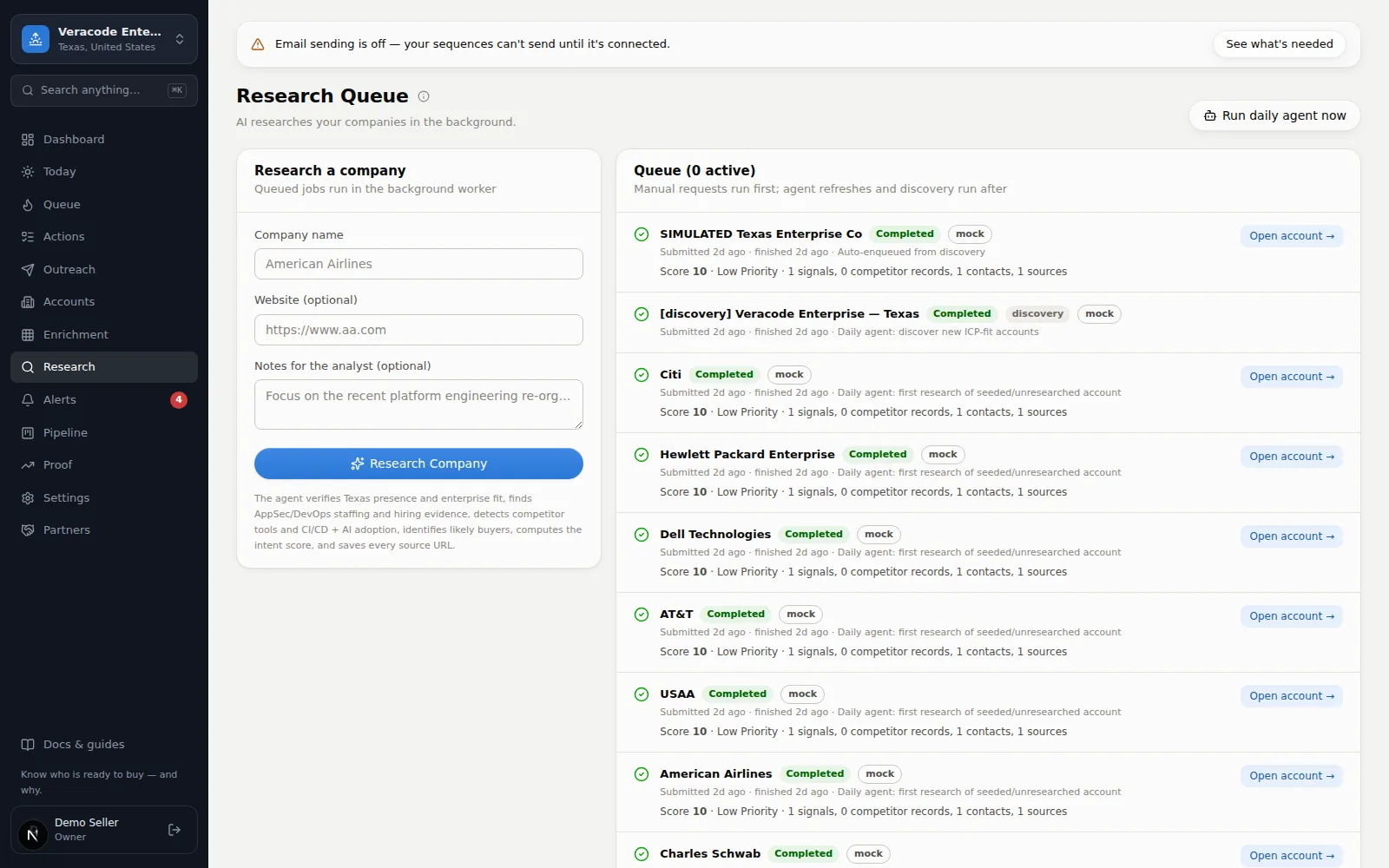
Submitting a company
Type the company name (website optional but helps Diurno HQ be sure it's the right one — a bare domain like acme.com or a full URL both work), add a note for the analyst if there's something specific to look at, and hit Research Company. A toast confirms it's queued (on a narrow screen the page scrolls down to the queue). The agent verifies fit against your workspace's geography and vertical, gathers sourced signals, detects competitors, finds likely buyers, and scores the account — automatically.
Each job shows a readable type (Account research, Contact re-check, …) and its lane (Instant lane or Overnight lane). Asking for a company that is already waiting or running returns that job — it isn't queued or charged twice. If your request carries a note and the job is still waiting, the waiting job takes your note (and is then researched fresh); if it is already running you're told to ask again once it has finished. If two waiting jobs for the same work ever do exist at once (a request typed here and the account's own Research button landing together, for example), the agent keeps one when it picks them up, a note typed on either goes with it (that job never uses a shared public snapshot), and the other is marked Skipped and its run is given back on the Free plan. Removing a queued job with 🗑 asks first; on the Free plan a waiting job that is removed gives its run back, once — that includes a company the overnight discovery queued and a lookalike search an automation queued (a job the agent has just picked up can't be removed, and no run is returned for it). The form limits the company to 200 characters, the website to 300 and the note to 500, and the list shows the newest 200 jobs, saying how many more are running or waiting and not listed.
Job statuses
| Status | Meaning |
|---|---|
| Queued | About to start (instant lane). Usually seconds. |
| Waiting · overnight (free) | Held for the free overnight batch — worked through in batches with no guaranteed turnaround; the queue header explains it once. Where an instant lane exists, the ▶ button runs it now as an instant research instead (uses 1 from your monthly allowance; it is disabled, with the reason, once the month's instant allowance is spent). |
| Researching | Running right now. |
| Completed | Done — a one-line outcome says what came back for each kind of job (score and evidence for research; verified contacts, joins and departures for people checks; candidates found for a company search). “Open account →” jumps to the result; a finished company search offers “View candidates →”. |
| Failed | Something went wrong — the reason is shown in plain words (for example, the research provider is out of credits, or a Free-plan limit was reached), with the provider’s raw message under “Technical detail”. Retry with the ↻ button; its tooltip names the lane and the cost: on a paid plan a retry of an instant run uses another instant research (when the month’s allowance is used it waits for the overnight batch instead); on Free it goes back to the overnight queue and counts against the month’s runs; where there is no instant lane it goes back to the overnight queue. A job stuck “running” after a restart is put back in the queue up to three times, then fails with a plain message you can retry. |
| Skipped | A newer research job for the same work replaced this one (“Superseded by duplicate job #N”). It is not a failure. |
Research health
Above the queue, Diurno HQ says plainly whether research is flowing. A green line means it is, with the age of the oldest waiting job. When something is wrong you get a banner instead of jobs that sit in the queue forever:
- AI research is paused — the research provider is out of credits (red, with how long it's been failing) — every new or retried job fails on the provider's billing. New requests are paused (the form button reads Research paused and the ▶/↻ buttons disable) so nothing is accepted that can only fail; nothing already on file is lost, and waiting jobs run once the provider is back. Your admin tops up the provider account and research reopens on its own. The guide strip names it for admins on every screen.
- Instant research is turned off on this deployment (amber) — “Only free overnight research can run jobs here, so new requests wait for the overnight batches.” The box below says what that means for you.
- N overnight jobs have been waiting (amber) — the oldest has been held 36+ hours and no overnight batch has completed one for this workspace in that time. Promote the urgent ones with ▶, or ask your admin to restart overnight research.
- Queued research hasn't started (amber) — instant jobs have waited 30+ minutes without starting. Ask your admin to contact Diurno HQ support; your jobs stay queued and run once it resumes.
When the notice says instant research is turned off
“Failed: ambiguous company” is honesty, not a bug
Run daily agent now
The button top-right triggers the daily agent immediately: refresh stale accounts, research never-researched ones, look for new companies, queue people and champion checks, re-score with decay, and pre-build today's Daily Brief (the morning email digest sends too, once per day, where it's configured). When it finishes it reports what it queued — and if any step of a workspace couldn't run, it says so and names the steps instead of claiming everything is up to date. The batch sizes are per day (counted in the scheduler's timezone, US Central unless changed), so a second run the same day — a restart, or pressing the button again — queues nothing more once the day's batch is out; scores, alerts and the Daily Brief are still refreshed by every run. It runs one at a time per organization, at most 10 an hour, lists only the workspaces you can see, and is disabled while the research provider is out of credits.