Screens
Account page
One company's full story: score, brief, and every tab explained.
The account page is one company's full story. Top to bottom: the header (score and controls), the next-action bar, the trigger brief, then tabs with every piece of underlying evidence.
Header
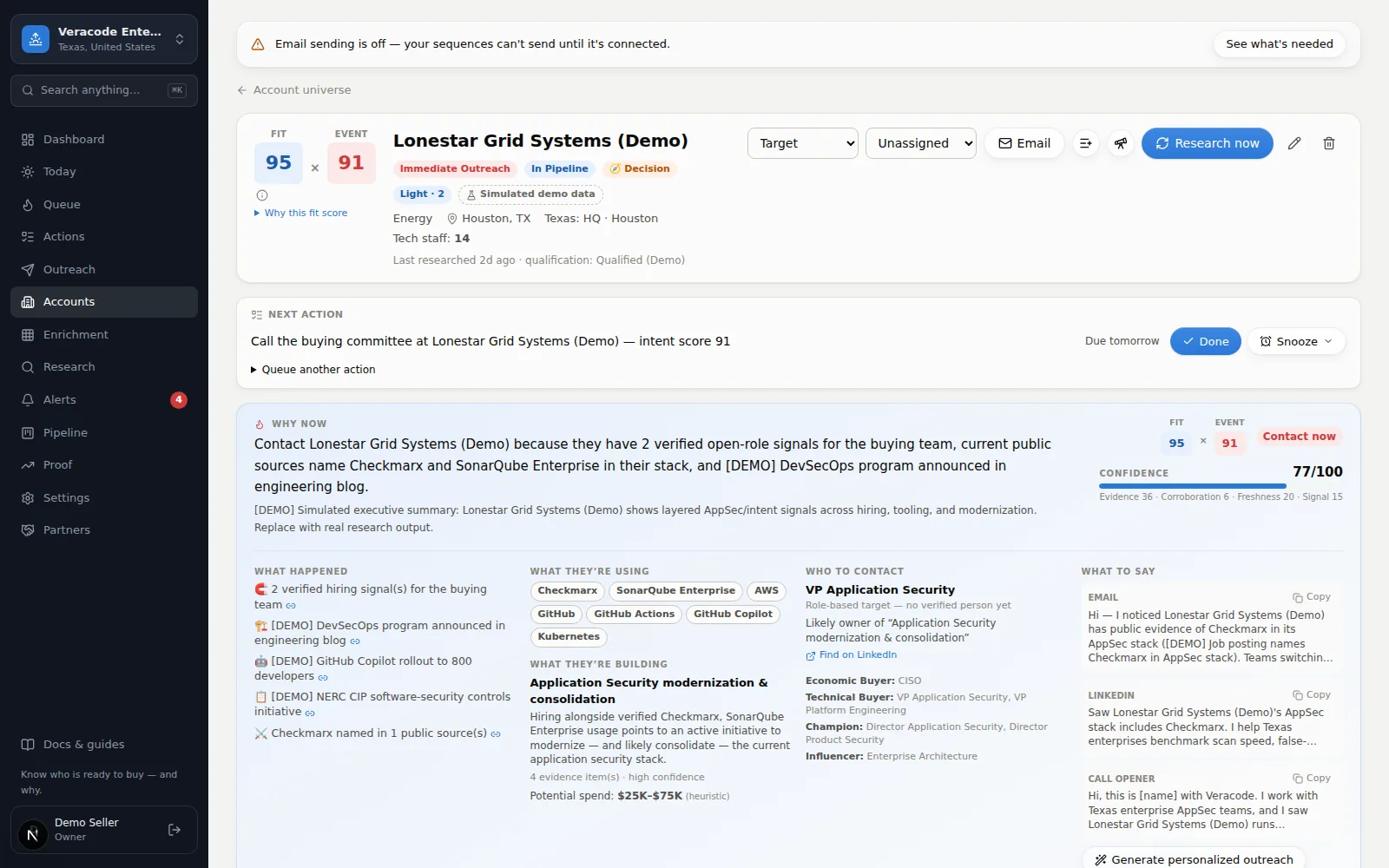
- Fit × Event pair — the two scores side by side: Fit (whether they match who you sell to — your ICP — with the reasons one click away) and the Event score (whether something is happening now). A good-fit account with no live event shows “watch, don't call yet” — that's the pair doing its job. Priority, journey, buying-stage and engagement chips follow; hover any chip for the reason behind it.
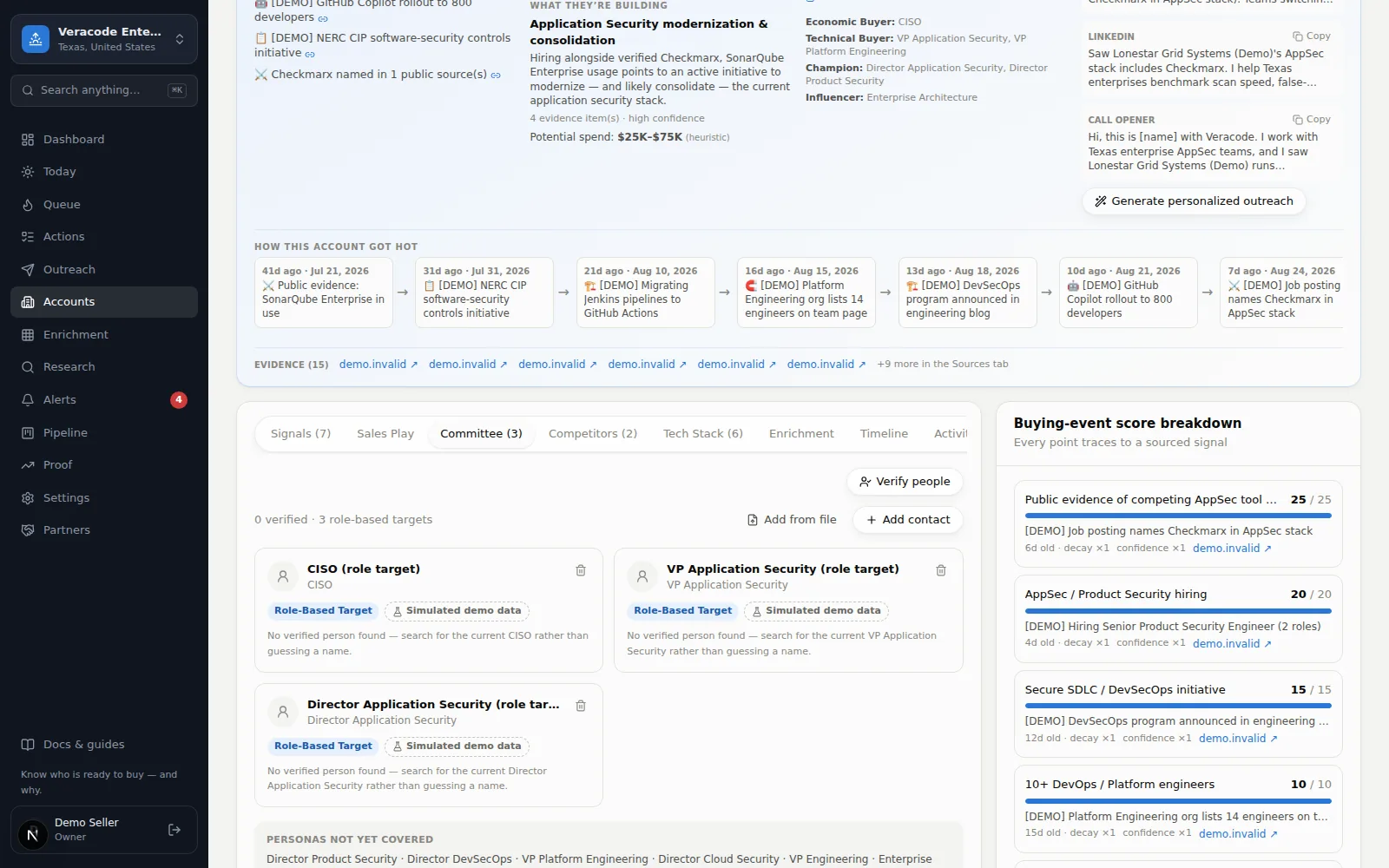
- Why Event N? — the link under the scores opens the Score breakdown: every point traced to a sourced signal.
- Pipeline status and Owner — the labelled dropdowns on the header's second row. Set who owns the account and where it stands (New → Researching → Researched → Target → In Pipeline → Customer, or Disqualified). Flipping to In Pipeline auto-creates a pipeline opportunity so the Pipeline screen always reflects it.
- Email / Enroll / call — send a custom email (template or AI opener, previewed before it goes), enroll the account in an outreach sequence, or click-to-call the main line and log the outcome in one motion. While email setup isn't finished, Email off links to the setup checklist instead of opening a composer that can't send.
- Research now — re-run full research on this company. It uses an instant research while this month's allowance lasts, then the free overnight lane. You stay on the page: a status line under the buttons reads Queued, Running, or Held on the free overnight lane, with a View in Research link, and the button stays disabled until the run finishes.
- Push to CRM / Push to HubSpot / Push to Salesforce (Beta; Update in Salesforce once linked, plus Open in Salesforce) — appear once your CRM is connected; send this account there. A successful push lists anything it left out; if a push fails, the reason shows under the button.
- Pencil — edit firmographics (a website is stored as a web address, up to 300 characters; text that isn't a web address is refused with “That doesn't look like a web address”). Only the fields you change are sent, so a stored website that isn't a web address (an imported “N/A”, say) doesn't stop you editing the phone or notes — the field says so, and it is refused only if you edit it to something that isn't one.
- More (⋯) — Find similar companies (lookalike search: opens the Prospector pre-filled to find companies shaped like this one) and Delete account (asks first, naming the account). Deleting removes the account with its contacts, emails, sequence enrollments, next steps, evidence, alerts, history and CRM links; website visits matched to it stay as anonymous visits (their matched domain, network name and, when it points back at the company's own site, referrer are blanked; the page count, path and day stay until the visitor retention window ends), finished research jobs stay as history without the account link (except the champion move checks of its people, which go whether open or finished, together with the “Your champion … moved” alerts about them), and open research jobs are cancelled. On the Free plan, an overnight research run for the account that was still waiting for its batch is returned to the month's allowance; a run already in progress is not. Copies already pushed to a CRM, Slack or a webhook are not removed, and an unsubscribed person's address stays on your organization's do-not-email list.
A link to an account that was deleted, or that you don't have access to, shows Account not found with a way back to Accounts. Any other failure shows Couldn't load this account with Try again.
Next action bar
The single next step for this account — type it, pick an optional due date, and press Set next action. Complete it with Done and you're asked for the next one — accounts in play should never have an empty next action. Queued follow-up actions listed under it can be marked done or removed individually. “Overdue”, “Due today” and “Due tomorrow” follow your workspace's sending timezone, the same day the Actions list uses.
Trigger brief
The brief is the “sales-ready” summary: What happened (sourced facts), the likely project and — when a verified team size exists — a spend range labelled as a heuristic, who to talk to (the buying committee with verification marks and a LinkedIn handoff — a direct profile link for verified people, a pre-filled people search otherwise), and What to say — email, LinkedIn, and call openers you can personalize with one click.
- The urgency chip uses the same four labels as the header: Call now, Call this week, Monitor, or No trigger yet.
- The confidence meter has an ⓘ tip explaining its four parts — Strength (how strong the evidence is), Sources (how many agree), Fresh (how recent), and Breadth (how many different angles confirm it).
- What to say shows the email subject; Show full copy expands long copy, and [bracketed] fill-ins are highlighted so you never send a blank by accident.
- How this account got hot — the timeline opens at the triggering event. +N more in the Sources tab jumps straight to the full source list.
The tabs
The open tab is part of the address (?tab=committee, ?tab=activity…), so reload and Back return to the tab you were on and a link can open straight onto one. The tab list wraps onto a second line rather than hiding tabs.
| Tab | What's inside |
|---|---|
| Signals | Every intent signal with its source link, age, and an age chip (Fresh, Aging, Stale, Historical — hover it for the weight the score gives that age under your workspace's decay settings). A lead without a source or marked Needs Verification stays listed but scores zero. Add one manually — see Add intent by hand. Dismissing a signal marks it “Dismissed · not scored”, rescores the account, and offers Undo in the toast. |
| Score breakdown | Screens narrower than a wide desktop only (on a wide screen it sits beside the tabs): every point of the Event score traced to a sourced signal, in plain words — “full weight”, “60% weight (aging)”, “counted at 50% for confidence”. |
| Sales play | The recommended play for this account: discovery questions, openers, and why it fits. With no plays set up, it points to the play library in Settings → Research profile; when no play matches the evidence, it offers Research this account. When the brief already has personalized copy, the play's openers are labelled as templates. A play is recommended only when the account's sourced evidence meets its trigger (a competitor it shows, a signal type it names); a play whose conditions can't be read is never recommended, so no play is better than a wrong one. In a play's email, call and LinkedIn text, {company} is the account's name and {signal} is the title of the current, sourced signal that matched the play's trigger; when no signal did, the “( … )” it sits in is left out. |
| Committee | The people: names, titles, personas, verification status. Contacts arrive from research, from the Prospector's decision-makers (named people as Needs Verification with their source; titles as role-based targets, marked with a Role-Based Target badge), by hand (Add contact), or from a CSV (Add from file — everyone lands as Needs Verification). A contact is Verified only when it has a public source link; a LinkedIn link alone leaves it Needs Verification — for a person research found as much as for one you add: a name with only a LinkedIn profile is kept as a Needs Verification lead, and a LinkedIn page given as the “source” counts as the profile link, not as a source. The summary counts only Verified people and lists the rest as “N need verification”. The Verify people button re-checks everyone against public sources. Ticking Do not email puts the address on your organization's do-not-email list and ends that person's sequences; unticking works for a flag you set yourself, an opt-out read out of a reply needs an owner or admin to confirm, and a person's own unsubscribe, a bounce or a spam complaint can't be switched back on here. Removing a contact asks first, removes the emails sent to them, the sequences started for that person, the reply they sent (its timeline entry and its alert), the “Completed” line of each finished next step that named them, and the champion move checks and “Your champion … moved” alerts about them (the checks show on the Research page as “[champion] <name>”), rewrites their name in their own “clicked a link” signals to “A contact”, and stops research from adding the same person back; the account is no longer Engaged because of a touch that went with them. A sequence started for the whole account is not removed: it keeps running without the step that named them and opens a new one for someone else at its next check, and a LinkedIn or call touch it had logged for them stays on the timeline as “Send a LinkedIn message to a contact — <sequence>, step N” (or “Call a contact — …”), with their name and the message removed. Editing a contact’s name to a different person removes the Verified status and public source the old person had (it becomes Needs Verification until a source for the new name is added); a change of case or spacing keeps them. |
| Competitors | Public evidence of rival products in the account, with the displacement angle. Deleting evidence asks first. |
| Tech stack | Technologies the account demonstrably uses, each with its evidence text and the date it was observed. |
| Enrichment | Your research questions answered for this account — ask new ones right here, or manage them on the Enrichment screen. |
| Timeline | Everything that ever happened on the account, newest first. Chips filter it: All, Activity, Signals, Research, Contacts, Deals & score. Technology or competitor entries with no source, or marked Needs Verification, read “Technology lead (unverified)” / “Competitor lead (unverified)”; “Verified <date>” appears only on evidence with a source and a scoring confidence. |
| Deals & activity (N) | This account's opportunities — always shown, with an empty state when there are none; each links to its row on the Pipeline screen, which scrolls to and highlights it — plus your team's logged touches: calls, emails, meetings, notes. |
| Sources | The public pages that research, enrichment answers, people checks, discovery and the Prospector saved for this account. A URL you type onto a signal or contact is kept on that item and does not appear here. |
The predicted buying stage reads No intent yet for accounts with a good profile but no live buying evidence. A dated renewal clue puts an account in the Decision stage only while the clue has a public source, a confidence above Needs Verification and hasn't decayed to zero under your workspace's decay settings.
Emailing from the account page
The composer never pre-picks a contact marked do not email (the list shows them greyed out, labelled “do not email”). Under the preview, a recipient who is on your organization's do-not-email list is named with the cause: “<name> is on your do-not-email list (they unsubscribed) — this won't be sent.”, where the bracket reads “they unsubscribed”, “they asked to stop in a reply”, “the address bounced”, “they reported an email as spam” or “set by hand”; a card ticked do not email with nothing on the list behind it reads “<name> is marked do not email — this won't be sent.” The preview can say this for a contact whose card isn't ticked, because the list is kept by address for your whole organization. With no recipient chosen, the preview picks the first person who can be emailed. If email sending is off it says so up front — Send is disabled, Preview still works. Pulling in a template or the AI opener asks before it overwrites a draft you've typed, and the draft clears after a send so it can't go twice.