
Screens
Pipeline
Lightweight opportunity tracking from prospect to closed.
Pipeline is deliberately lightweight opportunity tracking: opportunity, account, stage, value, probability, projected close, next action, and last activity. Opportunities appear three ways: create one from an account page once a conversation is real, add one straight from the Pipeline screen with Add to pipeline (pick the account, done), or simply set an account's status to In Pipeline — that creates the opportunity for you. A new deal is named <account> — opportunity unless you type a name; click any opportunity name in the table to rename it in place.
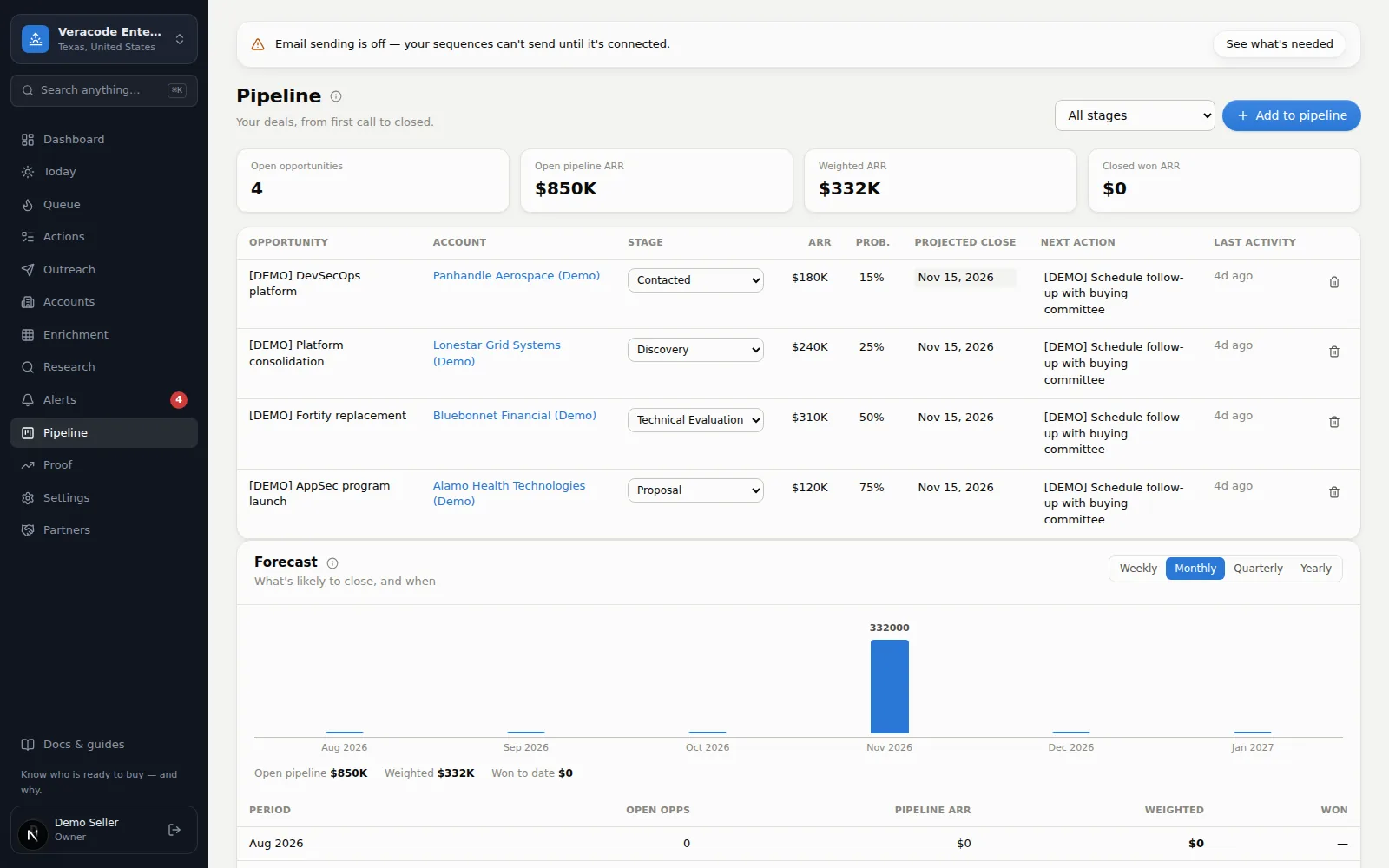
- Stages run Prospect → Researching → Contacted → Discovery → Demo → Technical Evaluation → POC → Proposal → Negotiation → Closed Won / Closed Lost.
- Weighted pipeline (value × probability) rolls up to the dashboard KPIs. A deal's ARR is limited to 0 – 1,000,000,000,000.
- Closing — a deal created as Closed Won or Closed Lost is closed as of now (and the forecast counts the win); closing a deal as won sets the account to Customer, re-opening the only won deal puts it back to In Pipeline, and editing a closed deal without changing its stage keeps its close date.
- Activity logged on the account (calls, emails, meetings) updates last-activity here and feeds the engagement score.
- Filter by stage — when a stage has no deals, Show all stages brings the full table back. On a phone the table becomes stacked cards.
- Proof feeds from here — each opportunity stamps the account's Event and Fit scores at the moment it's created, which is what powers the Proof report. Log opportunities as they happen and the proof takes care of itself.
Forecast
Below the board, the Forecast rolls open pipeline up by projected close date — switch between weekly, monthly, quarterly, and yearly buckets. Each bucket shows open pipeline, weighted ARR (× probability — the number most teams call the forecast), and what actually closed, in dollars (“$332K weighted · Dec 2026”); a period with nothing in it reads “—”. It refreshes after any deal change. Two honesty rails: deals with a past close date show as overdue (fix the date or the deal), and deals with no close date are called out as invisible to any forecast. Click either note to filter the deal table to exactly those deals (a removable chip appears next to the stage filter). Arithmetic, not prediction — the methodology ships with the numbers.
Diurno HQ is not trying to replace your full CRM