
Screens
Enrichment Grid
A research spreadsheet: every account × every question, with sources.
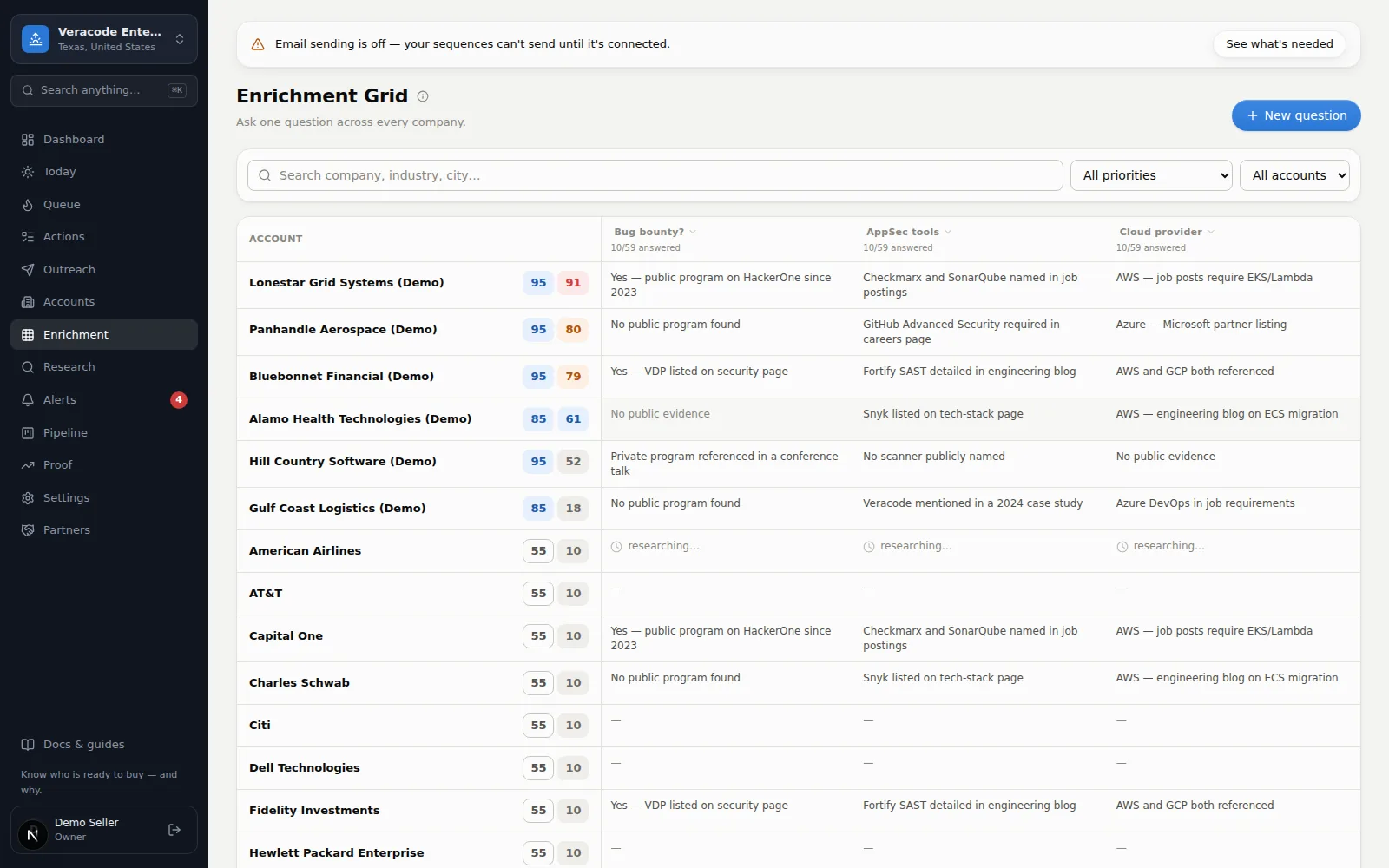
The Enrichment Grid is a research spreadsheet. Accounts run down the side; your questions run across the top; every cell is that question answered for that account — with source links. Ask anything: “Latest funding?”, “Do they run a bug bounty?”, “Which cloud are they on?”
Around the grid
- New question (top right) adds a column. Write the question the way you'd ask a smart analyst. The dialog also asks what to do once the column exists: Queue free overnight (the default — no charge), Run now (uses your monthly instant allowance, one per account), or Don't run yet. Either run covers the accounts in your current filter or segment.
- Column menu — click a column header, or its Run… button (shown while some accounts are still unanswered). The menu names its Scope and offers Answer missing now (allowance), Answer missing overnight (free), Refresh all answers now (allowance), and Delete column (after a confirm).
- Filters — search, priority, or a saved segment. Runs launched while filtered only target the accounts you see.
- Fit + Event chips sit next to each account name, so you can eyeball whether a well-researched row is actually your kind of customer.
- Click a cell (or tab to it and press Enter) to read the full answer with its sources and research date. The dialog's footer has Open account and Re-run this answer — or Retry this account after a failure — for just that one cell.
- Confirmations — Refresh all answers now always asks first, and Answer missing now asks when the scope is over 25 accounts, saying how many accounts and how much of your monthly allowance they use.
- Notices — the result of a run or delete shows as a dismissible note above the grid (errors in red); it clears when you change filters.
- Removing queued work — removing a queued refresh brings the earlier sourced answer back; removing a first-time question's job removes only the empty placeholder; removing a question removes its still-waiting jobs and, on Free, returns their runs.
The column headers stay pinned while the grid scrolls inside its card. Under each answer a small line says how well it's backed — N sources, Unsourced, or Low confidence — and a Needs Verification answer carries a warning icon. When filters hide every account the grid offers Clear filters; an empty workspace gets Go to Accounts. The grid shows 50 accounts at a time (Prev / Next under it), and a column run covers up to 500 accounts.
Cell states
| Cell | Meaning |
|---|---|
| Answer text | Answered, with sources. Click to read in full. |
| Researching… | Queued or in progress on the instant lane — the cell fills in automatically, and a cell that says this always has a job behind it. |
| Waiting · free lane | Held for the free overnight batch, with how long it has waited, when an instant lane exists. Where there is none (the Free plan, or instant research turned off) the same cell reads “Queued · overnight”. With an instant lane, click the cell and choose Run now to promote it to an instant research (uses 1 from your monthly allowance; unavailable while the research provider is out of credits). |
| No public evidence | Research ran and found nothing citable. The cell says exactly “No public evidence found.” with no sources — never a sentence research couldn't source. That's a real answer, not a failure. |
| — | Never asked for this account yet. |
| Failed | The run didn't finish (“Research didn't finish”), so nothing was concluded — the dialog shows no confidence and doesn't read as “no evidence”; if a refresh failed, the earlier answer is shown only when it was sourced. Click the cell and choose Retry this account (one more run for one account — on the instant lane where there is one, otherwise the overnight queue, and on Free it counts as a run). A cell that was waiting with no job behind it also shows as failed and can be retried. |
Costs nothing overnight
On the Free plan