
Screens
Dashboard
Your command center: KPIs, movers, top accounts, and charts.
The dashboard answers one question: what changed, and where should I spend today? It is the first screen you see after signing in, and it always shows the workspace you have selected in the sidebar.
What's on it
- The guide strip — the bar across the top (of every screen, not just this one) names your single next best step — add companies, work today's list, an overdue action, finish email setup — with a button that goes straight there. Green means you're caught up.
- Research a company… (top right) — type a company name and press Research: it queues the research and takes you to the Research screen to watch it.
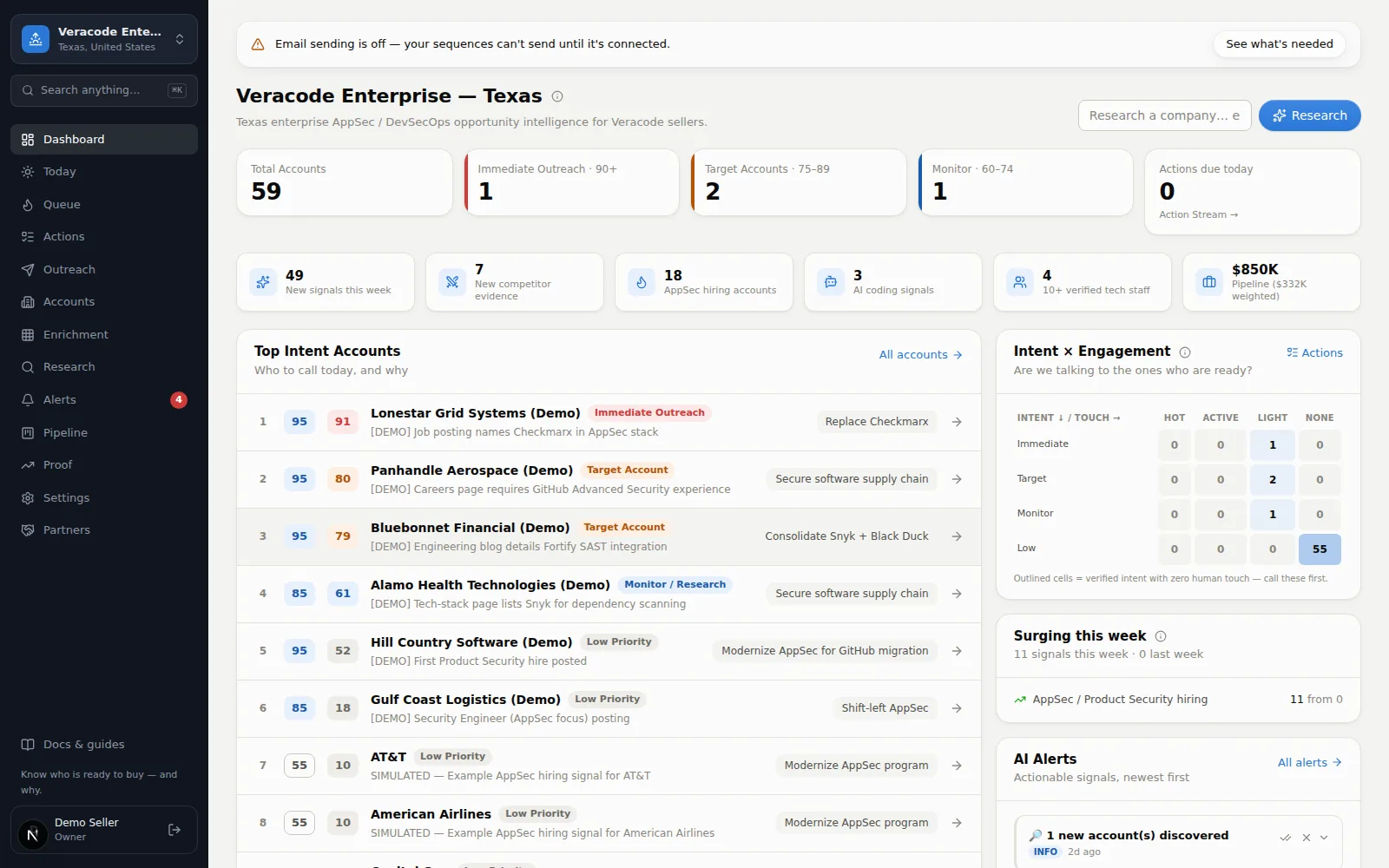
- KPI tiles — five totals at a glance: Total Accounts, the accounts in each priority band (labelled with the band and its range from your own thresholds, e.g. Call now · 90+, Call this week · 75–89, Monitor · 60–74), and Actions due today (with how many are overdue). Every tile is clickable and jumps to the filtered list behind the number. Under them, small stat chips count new signals this week, new competitor evidence, hiring-signal accounts and AI adoption signals (hidden when there are none), accounts with 10+ verified technical staff, and open pipeline value (with the weighted amount). The hiring and AI chips (active signals only) and the competitor-evidence chip count only what has a public source and a confidence above Needs Verification; the new-signals chip counts every signal added this week, leads included.
- Top Intent Accounts — the companies with the highest Event score right now, each with its Fit and Event badges, strongest signal, and recommended play. The timing chip says what to do: Call now, Call this week, Monitor, or No trigger yet — the same four labels on every screen (a strong fit with no fresh buying event). When nobody on the list is hot, the subtitle says so — it's a watch list that day, not a call list.
- Event movers · 7 days — who heated up or cooled off this week, with the score change. A big jump usually means fresh news worth reading before you call.
- Charts — Event score distribution (bars colored by your own priority-band thresholds), Accounts by metro (the subtitle names your workspace's geography), Accounts by industry, and your Competitor footprint (how many accounts show sourced evidence of each rival vendor; evidence with no source, or marked Needs Verification, isn't counted). Click a metro row or an industry bar to open that filtered Accounts list.
- Account journey — a funnel from Universe → Aware → Engaged → MQA (marketing-qualified) → Pipeline → Customer. Click a column to open the accounts at that stage. Engaged means a person on your side touched the account in the last 30 days — for example a one-off email, a call or LinkedIn message you logged, a meeting, a reply or a next step you completed; the emails a sequence sends on its own schedule don't count by themselves.
- Intent × Engagement — a grid comparing how ready accounts look (intent) vs. how much you've actually touched them (engagement). The dangerous corner is high intent + no engagement: buyers you're ignoring — the legend says whether you have any right now, and Action Stream → takes you to work them.
- Surging this week — your own scored signal types counted week over week, so you can see where the buying energy in your market is moving. The headline counts the scored signals this week against last week — a signal counts only when it has a scoring rule, a public source and a confidence above Needs Verification — the card lists the five most active signal types (the headline counts them all), and signals with no scoring rule, no public source or a Needs Verification confidence are counted on a separate context line because they don't move scores. Transparent counting, not a purchased feed.
- Alerts — the newest alerts, so mornings can start here; Mark read, Mark done and Dismiss (or Acknowledge on a new critical alert) work right on the card. Full list on the Alerts screen.
On a phone the order changes to put the work first: top accounts, then the Intent × Engagement grid, alerts, and Surging this week, with the charts last. If the dashboard can't load, it says so with Try again rather than showing empty charts.
A good morning routine
When the workspace is empty
A brand-new workspace puts one card and one question at the top: “This workspace is empty — want Diurno HQ to fill it?”. Find companies for me opens the company search (paste your website there and AI drafts the filters); Import my own list takes you to Accounts for the CSV path. Either way the dashboard fills in on its own from there.