
Screens
Sales Queue
Who to contact today and why — evidence turned into a ranked call list.
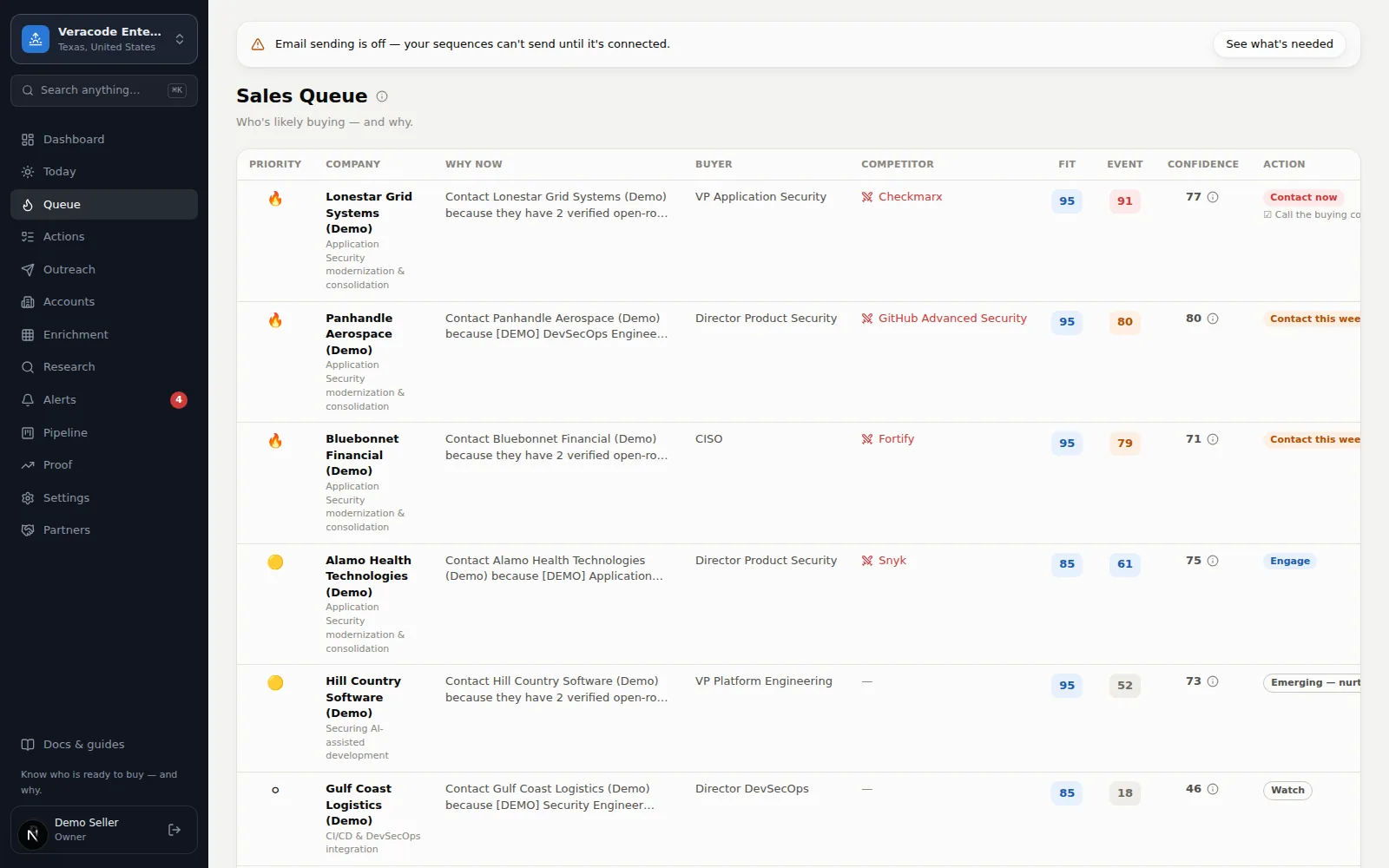
The Sales Queue is your ranked call list — your top 50 accounts by Event score. Every row is a company with sourced buying evidence, translated into: why now, who to talk to, and what to do. Accounts needing contact now come first, then “contact this week.” Customers and disqualified companies aren't listed (the same rule as Today).
Reading a row
| Column | Meaning |
|---|---|
| Company | Click anywhere on the row to open the full account page. |
| Why now | The one-line reason, built from the freshest sourced evidence the score counts. For accounts at Call now / Call this week it reads “Contact … because …”; below that it reads “… is worth watching: …”, so the sentence never tells you to call an account the badge says to watch. |
| Buyer | The best person to contact. A check mark means the person was verified against a public source. |
| Competitor | A rival product the account shows public evidence of using — your displacement angle. |
| Fit | Fit, 0–100: does this company match who you sell to (your ICP)? A dash means not assessed yet. Fit says whether; Event says when. |
| Event | The 0–100 Event score: is something happening now? |
| Confidence | How well-supported the whole story is — evidence strength, how many sources agree, freshness, and how many angles confirm it. |
| Action | The priority chip (Call now / Call this week / Monitor / No trigger yet) and, under it, the account's next action if one is set. |
On a phone both tables become stacked cards with the same information.
Competitive displacement
Below the queue, the displacement board lists accounts with sourced evidence of a competitor you track, grouped by company (one row per competitor found). Switch readiness — High, Medium, or Low — is a rules-based rating from that evidence, not a statistical probability: points for evidence volume and freshness, a public renewal clue (only while it has a source, a confidence above Needs Verification and hasn't aged out under your decay settings), a recent leadership change, a consolidation or modernization project, and hiring for the team that owns the tool. The ⓘ next to the column spells out the exact rules, and the Signals column lists what counted.
From row to conversation
- 1Open the top rowThe account page opens with the full trigger brief.
- 2Read “What happened”Three bullets of sourced facts — enough to sound informed in the first sentence.
- 3Use “What to say”A ready email, LinkedIn message, and call opener. Personalize it with one click — the copy is grounded only in that account's real evidence. See Generate outreach.